Note on Transparency: This article was generated with the assistance of Artificial Intelligence to provide a comprehensive and up-to-date overview of the discussed topic.
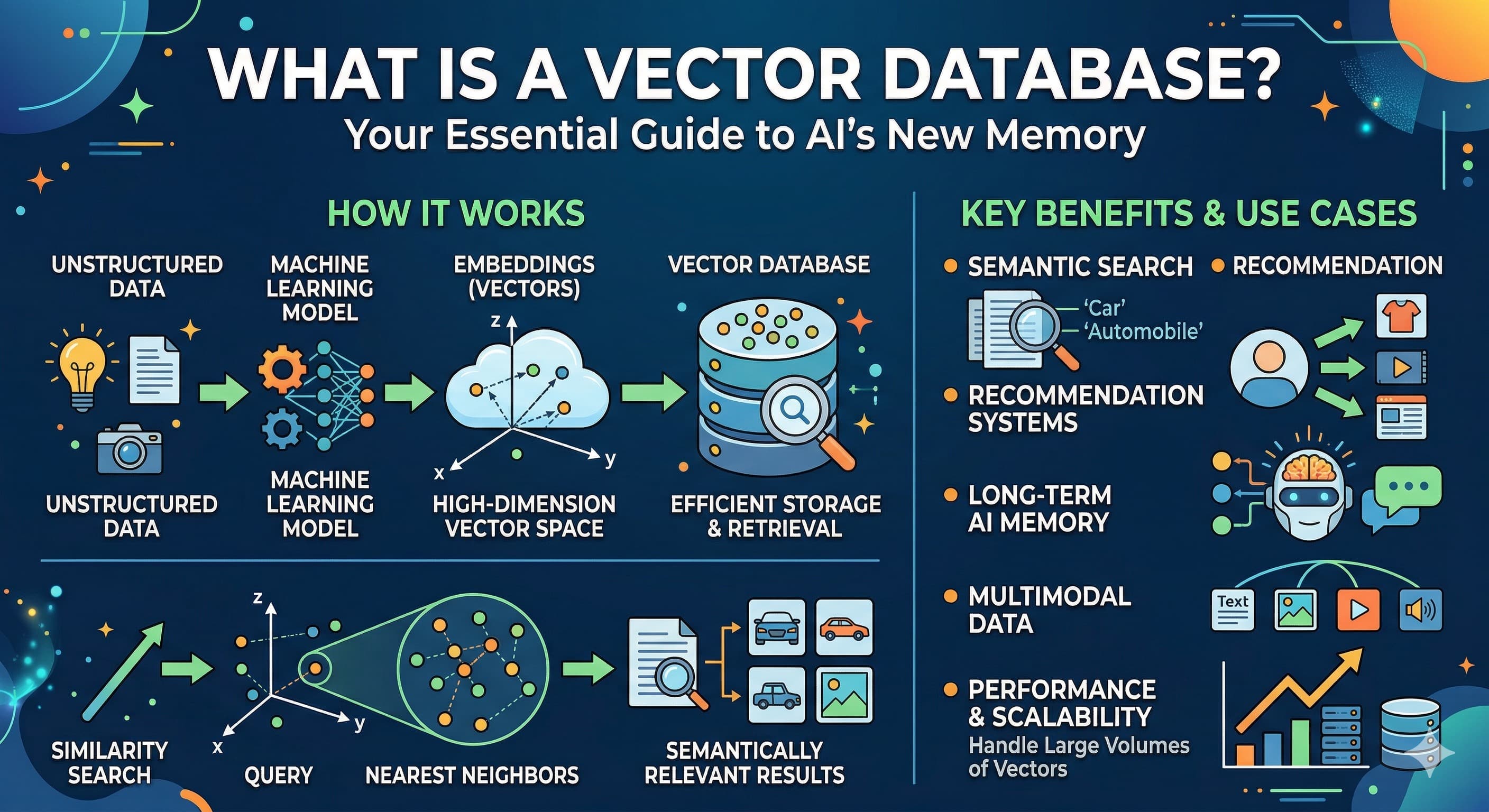
A vector database is a database purpose-built to store data as high-dimensional numerical vectors (embeddings) and retrieve records by semantic similarity instead of exact keyword matches. That's what lets an AI system search by meaning — finding "horses" when you search "equine companions" — and it's the component that powers semantic search, recommendation engines, and Retrieval-Augmented Generation (RAG) for LLMs.
The AI Revolution's Secret Weapon: Unlocking the Power of Vector Databases
Ever wondered how the latest AI breakthroughs, like those incredible Large Language Models (LLMs) and mind-blowing generative AI tools, seem to "understand" what you're asking? How do they pull out the perfect piece of information, even when you don't use the exact keywords? It’s not magic (mostly!). There’s a secret weapon, a specialized kind of digital brain that helps AI remember context, grasp nuances, and retrieve relevant information at lightning speed and massive scale: the Vector Database.
Introduction: The AI landscape is evolving rapidly, with Large Language Models (LLMs) and generative AI pushing boundaries. But how do these intelligent systems remember context, understand nuances, and retrieve relevant information at scale?
The world of Artificial Intelligence is experiencing a renaissance. From composing symphonies to drafting entire codebases, generative AI is redefining what machines can do. But for all their brilliance, LLMs have a significant limitation: their knowledge is often frozen at the time of their last training. They might "know" a vast amount of general information, but they struggle with real-time data, proprietary company documents, or your specific, niche questions. This is where the concept of AI memory becomes not just useful, but critical.
The Memory Challenge for AI: Why traditional databases fall short when AI needs to understand meaning, not just exact matches.
Think about how you usually search for information online. You type in keywords, and the search engine looks for documents containing those exact words. Traditional databases, whether they're old-school relational (SQL) databases or newer NoSQL stores, work much the same way. They're fantastic for structured data – finding "all customers in New York" or "products with SKU 12345".
But AI doesn't think in keywords; it thinks in concepts. If you ask an LLM about "equine companions," it should understand you mean "horses." A traditional database would likely scratch its head unless "equine" and "companions" were explicitly linked or present. This fundamental disconnect highlights the memory challenge: AI needs a database that understands meaning, context, and relationships, not just rigid data structures or keyword presence.
Analogy Time: Imagine you're looking for a specific book in a library.
- Traditional Database: This is like a librarian who only knows how to find books by their exact title or author. If you ask for "the one about the wizard boy," they'd stare blankly.
- Vector Database: This librarian understands what the book is about. You could ask for "a fantasy novel about a young wizard," and they'd point you right to "Harry Potter," even if you didn't say the title.
Enter the Vector Database: An overview of how this specialized database is becoming indispensable for modern AI applications.
This is where the Vector Database steps in, acting as the intelligent librarian for AI. Instead of storing data in tables or documents, it stores information as vectors – numerical representations that capture the semantic meaning of text, images, audio, or any other data type. When you query a Vector Database, it doesn't look for keywords; it looks for vectors that are numerically similar to your query vector. This means it's searching for meaning, making it an indispensable tool for truly intelligent applications.
What You'll Learn: A roadmap for understanding the core concepts, applications, and practical considerations of vector databases.
By the end of this guide, you'll have a solid grasp of:
- The essential terminology that makes vector databases tick.
- How they transform raw data into meaningful numerical representations.
- The clever ways they allow AI to "remember" and retrieve information contextually.
- Real-world examples of how they're enhancing everything from chatbots to recommendation engines.
- Why they're different from the databases you might already know.
- Key considerations for choosing and implementing a Vector Database in your own projects.
from sentence_transformers import SentenceTransformer

# Initialize an embedding model
# This model converts text into numerical vectors
model = SentenceTransformer('all-MiniLM-L6-v2')

# Example data
documents = [
    "The quick brown fox jumps over the lazy dog.",
    "A sly fox leaps past a dormant canine.",
    "Artificial intelligence is transforming industries.",
    "Databases are essential for storing and managing information."
]

# Create embeddings for the documents
document_embeddings = model.encode(documents)

# Conceptual storage in a vector database (simplified representation)
# In a real scenario, these embeddings would be upserted using a vector DB client
vector_database_entries = []
for i, embedding in enumerate(document_embeddings):
    vector_database_entries.append({
        "id": f"doc_{i}",
        "text": documents[i],
        "vector": embedding.tolist() # Convert numpy array to list for display
    })

print("First document embedding (first 5 dimensions):")
print(vector_database_entries[0]["vector"][:5])
print(f"\nConceptual entry for 'doc_0':")
print(vector_database_entries[0])
Jargon Buster: Decoding Vector Database Terminology
Before we dive deeper, let's unpack some key terms. Understanding this vocabulary is like getting a map to navigate the world of vector databases.
-
Vector: Imagine a string of numbers, like
[0.1, -0.5, 0.9, 0.2, ...]. This is a vector. In a Vector Database, it's a numerical representation of data (text, image, audio, etc.) in a multi-dimensional space. Each number in the string is a "dimension," and the entire sequence describes the item's location in this abstract space. Think of it as a super-detailed coordinate that uniquely describes the meaning of a piece of data. -
Embedding: This is the magical process of converting your raw data (like a paragraph of text, an image file, or an audio clip) into that numerical vector. It's done by a specialized machine learning model called an embedding model. This model "reads" your data and produces a vector where similar items will have numerically similar vectors. It's like translating complex thoughts into a universal numerical language that computers can easily compare.
-
Vector Space: This is the abstract, multi-dimensional world where all these vectors live. It's not a place you can physically see, but you can visualize it as a vast landscape. In this landscape, things that are semantically similar (e.g., two sentences about cats) will have their vectors positioned very close to each other. Things that are very different (e.g., a sentence about cats and a sentence about rocket science) will be far apart.
-
Similarity Search: The bread and butter of any Vector Database. This is the core operation of finding vectors that are "close" to a given query vector in the vector space. If two vectors are close, their underlying data is considered semantically similar. So, if you query with the embedding of "fuzzy pets," the similarity search will find documents whose embeddings are close to that, potentially returning "cute kittens" or "fluffy puppies."
-
Distance Metrics: How do we measure "closeness" or "distance" between vectors? With mathematical formulas called distance metrics.
- Cosine Similarity: This measures the cosine of the angle between two vectors. It tells you how similar their direction is, ranging from -1 (opposite) to 1 (identical). It's great for text, where you care more about the topic/direction of meaning than the magnitude.
- Euclidean Distance: This is the straight-line distance between two points (vectors) in the vector space. Smaller Euclidean distances mean greater similarity. It's like measuring the actual distance between two cities on a map.
-
Nearest Neighbor Search (k-NN): When you perform a similarity search, you're usually looking for the most similar items. k-NN is the technique of finding the 'k' data points (vectors) in your dataset that are closest (most similar) to a given query vector. If k=5, you want the 5 most similar results.
-
Vector Indexing: Imagine trying to find the 10 closest people to you in a stadium with 100,000 people. You wouldn't check every single person. Vector indexing is like building a smart, organized directory for your Vector Database. It uses specialized data structures and algorithms (like HNSW - Hierarchical Navigable Small World, or IVF_FLAT - Inverted File Index with Flat Quantization) that allow for incredibly efficient Approximate Nearest Neighbor (ANN) search over massive datasets. These indexes speed up similarity search dramatically by narrowing down the candidates, making a slight trade-off in perfect accuracy for huge gains in speed.
-
Semantic Search: This is the user-facing superpower enabled by vector databases. Instead of searching based on keywords, semantic search retrieves results based on the meaning or context of your query. It's why you can ask "show me comfortable footwear for running outdoors" and get results for "trail sneakers" or "jogging shoes," even if those exact words weren't in your query.
-
Retrieval-Augmented Generation (RAG): A truly transformative AI pattern! RAG leverages a Vector Database to provide external, factual, and up-to-date knowledge to LLMs. Instead of an LLM guessing or "hallucinating" facts, RAG first retrieves relevant information from your Vector Database (e.g., your company's internal documents) and then augments the LLM's prompt with this retrieved context. This helps LLMs provide more accurate, current, and domain-specific answers. It's like giving your brilliant but sometimes forgetful AI a trusty encyclopedia.
from sentence_transformers import SentenceTransformer
from sklearn.metrics.pairwise import cosine_similarity
import numpy as np

# Load a pre-trained embedding model
model = SentenceTransformer('all-MiniLM-L6-v2')

# Define some texts
text1 = "The cat sat on the mat."
text2 = "A feline rested on the rug."
text3 = "The car drove on the road."

# Create embeddings
embedding1 = model.encode(text1)
embedding2 = model.encode(text2)
embedding3 = model.encode(text3)

# Reshape for sklearn's cosine_similarity
embedding1_reshaped = embedding1.reshape(1, -1)
embedding2_reshaped = embedding2.reshape(1, -1)
embedding3_reshaped = embedding3.reshape(1, -1)

# Calculate Cosine Similarity
similarity_1_2 = cosine_similarity(embedding1_reshaped, embedding2_reshaped)[0][0]
similarity_1_3 = cosine_similarity(embedding1_reshaped, embedding3_reshaped)[0][0]

print(f"Text 1: '{text1}'")
print(f"Text 2: '{text2}'")
print(f"Text 3: '{text3}'")
print(f"Cosine Similarity (Text 1 vs Text 2): {similarity_1_2:.4f} (High, as they are semantically similar)")
print(f"Cosine Similarity (Text 1 vs Text 3): {similarity_1_3:.4f} (Low, as they are semantically different)")

# Example of a vector (first 5 dimensions)
print("\nExample of a vector (first 5 dimensions from text1):")
print(embedding1[:5])
Core Concepts: How Vector Databases Give AI Its Memory
Now that we're fluent in the jargon, let's pull back the curtain and see exactly how Vector Databases function as the memory for AI, solving real problems and enabling advanced capabilities.
What Exactly is a Vector Database?
At its heart, a Vector Database is a specialized type of database that is purpose-built to handle high-dimensional vectors and perform lightning-fast similarity searches on them. Think of it as a highly specialized librarian whose entire job is to organize, store, and quickly retrieve information based on meaning.
Unlike traditional databases that are structured around tables with rows and columns (like a spreadsheet) or documents (like JSON blobs), a Vector Database primarily deals with those numerical arrays we called vectors. Each vector represents a piece of data's semantic essence, and the database's architecture is optimized to perform complex mathematical comparisons between these vectors. It combines efficient storage for these vectors with sophisticated indexing algorithms (like the ANN methods we discussed) and robust APIs for querying, making it a complete system for managing AI's conceptual memory.
The Problem Vector Databases Solve
The biggest problem Vector Databases tackle is the gap between raw, unstructured data and AI's need for semantic understanding.
Limitations of Traditional Databases for Semantic Search
Imagine trying to store every unique human face in a traditional database and then wanting to find "faces that look generally happy" or "faces that resemble this one." You'd have to define countless attributes, and even then, performing a fuzzy, conceptual search would be incredibly inefficient, requiring complex logic and brute-force comparisons.
Traditional databases, whether relational (SQL) or NoSQL (document, key-value stores), are fantastic for what they were designed for: structured queries, exact matches, and managing predefined data schemas. But when you ask them to understand the meaning of an image or a block of text and find other items with similar meaning, they simply fall short. Storing vectors as raw data blobs in these systems would be a performance nightmare, as they lack the native indexing and query optimization necessary for high-dimensional similarity comparisons.
The Need for High-Dimensional Data Storage
Modern AI models, especially deep learning networks, produce rich, high-dimensional representations of data. An embedding for a simple sentence might have hundreds or even thousands of dimensions. Storing, managing, and, most importantly, querying these vast sets of high-dimensional numbers efficiently is a monumental task that traditional databases were never built to handle. Vector Databases are specifically engineered for this, providing the infrastructure to store billions of these complex numerical fingerprints.
From Data to Vectors: The Embedding Process Explained
The journey from raw data to semantic memory starts with embeddings.
How embedding models transform diverse data types into numerical vectors.
This is where the magic happens! An embedding model (often a pre-trained neural network) is the translator. It takes diverse forms of raw data – a block of text, an image, a spoken word, a snippet of audio, even tabular data – and converts them into dense numerical vectors. Each dimension in the vector captures a nuanced feature or aspect of the original data. For text, it might represent sentiment, topic, style, or specific entities. For images, it could be color, texture, objects present, or overall scene.
The role of context and meaning in vector representation.
The brilliance of embeddings lies in their ability to capture semantic context and meaning. This isn't just a random assignment of numbers. These models are trained on vast amounts of data to learn how different pieces of information relate to each other. So, if you embed the sentence "A canine chased a frisbee" and "The dog fetched a disc," their resulting vectors will be very close in the vector space because they convey a similar meaning, even though they use different words. Conversely, "The dog barked loudly" and "The stock market crashed" would produce wildly different vectors. This numerical proximity is the foundation of semantic understanding for AI.
How Vector Databases Work Under the Hood
The elegance of a Vector Database is in its specialized architecture.
Storing and Managing High-Dimensional Vectors
A Vector Database is designed from the ground up to efficiently store billions of vectors, each potentially having hundreds or thousands of dimensions. They often employ techniques like columnar storage or optimized data layouts to minimize storage footprint and maximize read performance. Crucially, they store not just the vectors but also associated metadata (like the original text, creation date, author, category, etc.) which allows for powerful filtering alongside vector similarity search.
Indexing Strategies for Blazing-Fast Similarity Search
This is the real secret sauce. If you had to compare every query vector to every other vector in a database of billions, it would take ages. This is why Vector Databases use sophisticated Approximate Nearest Neighbor (ANN) indexing algorithms. Instead of checking every single "neighbor" (every single vector), ANN algorithms create special data structures (like graphs or tree-like structures) that allow the database to quickly narrow down the search space to a small subset of likely candidates. Popular ANN algorithms include:
- HNSW (Hierarchical Navigable Small World): Creates a multi-layer graph where lower layers contain more connections (for fine-grained search) and higher layers have fewer, longer-range connections (for coarse-grained search), allowing for rapid traversal to approximate neighbors.
- IVF_FLAT (Inverted File Index with Flat Quantization): Partitions the vector space into clusters. When querying, it first finds the closest clusters and then performs a brute-force search only within those clusters, significantly reducing comparisons.
These indexes provide an excellent balance between search speed and accuracy, making real-time semantic search possible on enormous datasets.
Executing Complex Similarity Queries and Filtering
Beyond simple similarity search, Vector Databases allow for complex queries. Imagine wanting to find "documents semantically similar to this paragraph, but only if they were published in the last month and categorized as 'finance'." A Vector Database can execute such hybrid queries by combining its powerful vector similarity search with traditional metadata filtering, providing incredibly precise and context-aware retrieval. This capability is essential for practical AI applications.
Key Features and Capabilities
Modern Vector Databases come packed with features designed for demanding AI workloads:
- Scalability: Built to scale horizontally across multiple machines, handling datasets ranging from millions to trillions of vectors and supporting high query loads.
- Real-time search: Optimized for low-latency similarity searches, even when the underlying data is being updated frequently.
- Hybrid search: The ability to combine vector similarity search with structured filtering on metadata, allowing for more precise and relevant results.
- Data consistency: Mechanisms like replication, snapshotting, and fault tolerance ensure data integrity and high availability, crucial for production systems.
- Developer-friendly APIs: Many provide SDKs for popular languages, making integration with AI applications straightforward.
from sentence_transformers import SentenceTransformer
import uuid # For generating unique IDs

# Assume we have a vector database client initialized
class MockVectorDatabaseClient:
    def __init__(self):
        self.vectors = {}
        print("Mock Vector Database Client initialized.")

    def upsert(self, id: str, vector: list, metadata: dict = None):
        if metadata is None:
            metadata = {}
        self.vectors[id] = {"vector": vector, "metadata": metadata}
        print(f"Upserted vector with ID: {id}")

    def query(self, query_vector: list, top_k: int = 5):
        print(f"Querying for top {top_k} similar vectors (mock operation).")
        # In a real DB, this would involve ANN search.
        # Here, just a placeholder.
        results = []
        for vec_id, data in self.vectors.items():
            results.append({"id": vec_id, "similarity_score": np.random.rand(), "metadata": data["metadata"]})
        return sorted(results, key=lambda x: x["similarity_score"], reverse=True)[:top_k]

# Initialize an embedding model
model = SentenceTransformer('all-MiniLM-L6-v2')

# Sample document
document_text = "Vector databases are crucial for modern AI applications, enabling semantic search and RAG."
document_metadata = {"source": "blog_post", "author": "AI Researcher", "date": "2023-11-20"}

# Create an embedding for the document
document_embedding = model.encode(document_text).tolist() # Convert to list for mock DB

# Initialize the mock vector database client
mock_db = MockVectorDatabaseClient()

# Insert the document embedding and its metadata into the vector database
doc_id = str(uuid.uuid4())
mock_db.upsert(id=doc_id, vector=document_embedding, metadata=document_metadata)

# Example query (conceptual)
query_text = "What is the importance of vector databases for AI?"
query_embedding = model.encode(query_text).tolist()
search_results = mock_db.query(query_vector=query_embedding, top_k=2)
print("\nMock Search Results:")
for res in search_results:
    print(f"  ID: {res['id']}, Score: {res['similarity_score']:.4f}, Metadata: {res['metadata']}")
Modern Real-World Examples: Vector Databases in Action
The theoretical power of Vector Databases truly shines when you see them in action. They are the silent workhorses behind many of the intelligent applications we interact with daily.
Enhancing Generative AI & LLMs (RAG)
One of the most impactful applications of Vector Databases today is in Retrieval-Augmented Generation (RAG). LLMs are incredibly powerful, but their knowledge is limited to their training data, which can quickly become outdated. This often leads to "hallucinations" – where the LLM confidently generates incorrect or fabricated information.
RAG to the Rescue: A Vector Database allows an LLM to access external, real-time, and domain-specific knowledge. When you ask an LLM a question, a RAG system first uses a query to search a Vector Database for relevant information from your private documents, recent articles, or specific knowledge bases. This retrieved context is then provided to the LLM, dramatically improving the accuracy, relevance, and factual grounding of its generated response.
- Example: Custom AI chatbots for enterprises now frequently use RAG. Instead of giving generic answers, a customer support bot can retrieve specific product documentation, troubleshoot common issues from internal knowledge bases, or even access customer-specific historical data, all powered by a Vector Database. This provides highly accurate and personalized support, reducing agent workload and improving customer satisfaction. Leading AI platforms like OpenAI's Assistants API and Google's Vertex AI Search (formerly Enterprise Search) leverage similar principles to empower their generative AI capabilities.
# This is a conceptual snippet showing the steps, actual setup involves API keys and proper imports.
# Requires: pip install langchain sentence-transformers chromadb openai

from langchain.document_loaders import TextLoader
from langchain.text_splitter import CharacterTextSplitter
from langchain.embeddings import SentenceTransformerEmbeddings
from langchain.vectorstores import Chroma
from langchain.chains import RetrievalQA
from langchain.llms import OpenAI

# 1. Load data (e.g., from a file)
loader = TextLoader("./state_of_the_union.txt") # Assuming a file exists
documents = loader.load()

# 2. Split documents into chunks
text_splitter = CharacterTextSplitter(chunk_size=1000, chunk_overlap=0)
docs = text_splitter.split_documents(documents)

# 3. Create embeddings (using a local model via Sentence Transformers)
embeddings = SentenceTransformerEmbeddings(model_name="all-MiniLM-L6-v2")

# 4. Store embeddings in a vector database (ChromaDB)
# This will create a local ChromaDB instance
vectordb = Chroma.from_documents(documents=docs, embedding=embeddings, persist_directory="./chroma_db")
vectordb.persist() # Save the database to disk

# 5. Set up a retriever
retriever = vectordb.as_retriever()

# 6. Set up the RAG chain with an LLM (e.g., OpenAI GPT)
# llm = OpenAI(temperature=0)
# qa_chain = RetrievalQA.from_chain_type(llm=llm, chain_type="stuff", retriever=retriever)

# 7. Query the RAG system
query = "What did the president say about the economy?"
# response = qa_chain.run(query)
# print(response)

print("Conceptual RAG flow setup complete. To run, uncomment the necessary Langchain and OpenAI/LLM specific lines.")
print(f"Documents processed and stored in a ChromaDB instance at './chroma_db'.")
print("A real query would retrieve relevant chunks and pass them to an LLM.")
Intelligent Semantic Search Engines
Move beyond keywords! Vector Databases are revolutionizing search by allowing engines to understand intent and meaning.
- Example: E-commerce sites can now recommend products based on visual similarity ("show me shoes that look good for hiking") or descriptive phrases ("find me a casual, lightweight summer jacket"). The search engine embeds the user's query and finds products with similar embeddings, regardless of whether the product title uses those exact words.
- Example: Legal document search can identify conceptually similar cases, precedents, or clauses by searching their vector representations. This helps legal professionals quickly find relevant information, even if the specific legal jargon varies across documents.
Advanced Recommendation Systems
Personalization is key, and Vector Databases are the engine behind truly smart recommendations.
- Example: Netflix doesn't just recommend movies based on genre. It uses Vector Databases to find films whose semantic content and stylistic vectors are similar to films you've watched and enjoyed. This allows for highly nuanced recommendations that go beyond simple categories.
- Example: Spotify identifies songs that "feel" similar to your favorites, considering elements like mood, instrumentation, and energy, creating personalized playlists that match your unique musical taste.
Image and Video Recognition & Retrieval
Visual data is a rich source of information, and vector databases make it searchable.
- Example: Reverse image search (like Google Images) uses Vector Databases to take an uploaded image, embed it, and then find visually similar images or the original source by comparing image vectors.
- Example: Content moderation platforms use embeddings of images or video frames to identify duplicate, infringing, or inappropriate content by comparing it against a Vector Database of known problematic items.
Anomaly Detection and Fraud Prevention
Identifying the unusual in vast datasets is a critical task for security and finance.
- Example: Cybersecurity systems can detect novel threats. By vectorizing network traffic patterns or system call sequences, a Vector Database can flag significant deviations from established "normal" behavior or known malicious patterns, helping to identify zero-day attacks.
- Example: Financial services use vector databases to flag unusual transaction behavior, such as a large purchase in a foreign country immediately after a small local transaction. By embedding transaction details, the system can quickly identify patterns that deviate from a user's typical behavior or known fraudulent schemes.
Biotechnology and Drug Discovery
Even in scientific research, Vector Databases are accelerating discovery.
- Example: In biotechnology and drug discovery, researchers can vectorize chemical compounds, protein structures, or genomic sequences. This allows them to search vast databases for molecules with similar structures or properties to a known drug candidate, significantly speeding up the research and development process.
Practical Comparisons: Vector Databases vs. The Alternatives
To fully appreciate the unique value of a Vector Database, it's helpful to compare it to other data storage and retrieval technologies. Each tool has its strengths, and choosing the right one (or combination) depends on your specific needs.
Vector Databases vs. Traditional Relational Databases (SQL)
Relational databases are the bedrock of countless applications, but they speak a different language than vectors.
| Feature / Aspect | Vector Database | Relational Database (SQL) |
|---|---|---|
| Primary Data Type | High-dimensional Vectors, JSON (metadata) | Structured tables, rows, columns |
| Core Query Type | Similarity Search (semantic, "find like this") | Exact Match, Joins, Aggregations ("find X where Y=Z") |
| Understanding | Semantic, Contextual | Literal, Explicit |
| Scalability for Vectors | Built for high-dimensional data, massive scale | Poor for vector similarity, inefficient for high dimensions |
| Best For | AI applications, LLM context, recommendation | Transactional data, structured records, business logic |
Key Takeaway: If your primary need is to understand meaning and find conceptually similar items, a Vector Database is your clear choice. For strict, structured data management and ACID compliance, relational databases are king.
Vector Databases vs. NoSQL Databases (Document/Key-Value Stores)
NoSQL databases offer flexibility and horizontal scalability for unstructured data, but their focus is different.
| Feature / Aspect | Vector Database | NoSQL Database (e.g., MongoDB, Redis) |
|---|---|---|
| Primary Focus | Efficient vector similarity search | Flexible data models, high availability, horizontal scale |
| Data Structure | Vectors + associated metadata | Documents (JSON), Key-Value pairs, Graphs |
| Semantic Search | Native, optimized | Not native; requires external search layers or workarounds |
| Indexing for Vectors | Specialized ANN (Approximate Nearest Neighbor) | B-tree, Hash, or inverted indexes (not for vectors) |
| Use Cases | AI memory, RAG, recommendation, image search | Content management, user profiles, real-time analytics |
Key Takeaway: While NoSQL databases can store vector data as part of a document, they lack the specialized indexing and query capabilities to perform efficient similarity searches. A Vector Database is designed specifically for that, making it a better fit for AI-driven semantic understanding.
Vector Databases vs. Full-Text Search Engines (Elasticsearch/Solr)
Full-text search engines are great at finding words, but not necessarily meaning.
| Feature / Aspect | Vector Database | Full-Text Search Engine (e.g., Elasticsearch) |
|---|---|---|
| Primary Goal | Semantic similarity of any data type | Keyword-based search over text |
| Query Type | Vector comparison (e.g., cosine similarity) | Token matching, stemming, relevancy scoring |
| Understanding | Contextual, Meaning-based | Lexical, Keyword-based |
| Hybrid Search | Often supports filtering with metadata | Can be extended with vector plugins, but not native core |
| Best For | "What is this like?", AI-driven retrieval | "Find documents containing these words", log analysis |
Analogy: Full-text search is like finding a specific word in a dictionary. Semantic search (with a Vector Database) is like understanding the definition and finding other words with similar meanings, even if they aren't synonyms.
# Conceptual difference in approach for "smart" search

# --- Full-Text Search Engine (e.g., Elasticsearch) ---
# Query: "red running shoes"
# Search would look for exact words "red", "running", "shoes" or their stemmed forms.
# It would return documents containing these keywords.

# --- Vector Database (e.g., Pinecone, Qdrant) ---
# User query: "footwear for athletic outdoor activity in a crimson color"
# Embedding model converts query into a vector: query_vector = model.encode("footwear for athletic outdoor activity in a crimson color")
# Vector database performs similarity search:
#    results = db.query(vector=query_vector, top_k=5)
# Results might include: "red trail running shoes", "maroon sneakers for hiking",
#    "scarlet jogging footwear", even if these exact keywords weren't in the query.

print("Full-text search looks for keyword matches.")
print("Vector database search looks for semantic similarity based on meaning, powered by embeddings.")
print("This allows finding 'maroon sneakers for hiking' when searching for 'crimson running shoes'.")
Vector Databases vs. Standalone Vector Libraries (Faiss, Annoy)
Libraries like Faiss and Annoy are excellent tools, but they are components, not complete systems.
| Feature / Aspect | Vector Database | Vector Library (e.g., Faiss, Annoy) |
|---|---|---|
| Scope | End-to-end system: storage, indexing, querying, APIs, high availability | Just indexing and similarity search algorithms |
| Persistence | Built-in data persistence and recovery | Typically in-memory; persistence requires custom handling |
| Scalability & Ops | Distributed, fault-tolerant, managed features (cloud) | Local to a single machine/process, manual scaling |
| Features | User management, filtering, real-time updates, multi-tenancy | Core ANN algorithms, often highly optimized for speed |
| Use Cases | Production AI applications, large-scale deployments | Research, rapid prototyping, embedding model development |
Key Takeaway: Standalone libraries are perfect for research, prototyping, or integrating vector search into an application that already handles its own data persistence and distributed scaling. For robust, production-grade AI applications, a full-fledged Vector Database offers the complete package.
Common Pitfalls & Considerations
While incredibly powerful, implementing and managing Vector Databases effectively requires careful planning. Here are some key considerations and potential pitfalls to avoid.
Choosing the Right Embedding Model
This is arguably the most critical decision. The quality of your embeddings directly dictates the quality of your similarity search results.
Pitfall: Using a generic embedding model for a highly specialized domain (e.g., medical research or legal documents). A generic model might not capture the subtle nuances of jargon or specific concepts relevant to your field, leading to suboptimal search relevance. Consideration:
- Domain Specificity: If your data is highly specialized, look for embedding models fine-tuned on similar data, or consider fine-tuning a general model yourself.
- Performance & Cost: Evaluate models based on their benchmark performance for your task, the number of dimensions they produce (higher dimensions can be more expressive but costlier), and the computational resources required for inference. Popular choices include OpenAI's
text-embedding-ada-002, Google'stext-embedding-004, and various open-source models from Hugging Face'ssentence-transformerslibrary.
The Curse of Dimensionality
As the number of dimensions in your vectors increases, the mathematical distance between points can become less meaningful, making it harder for similarity algorithms to distinguish between items.
Pitfall: Assuming more dimensions are always better. While more dimensions can capture more nuance, too many can lead to increased computational cost, slower search times, higher storage requirements, and potentially reduced accuracy as data becomes sparser. Consideration: Understand that there's a point of diminishing returns. Choose models that balance expressiveness with a manageable number of dimensions. Sometimes, dimensionality reduction techniques (like PCA or UMAP) can be applied to vectors before storing them, but this often comes with a trade-off in information loss.
Scalability, Performance, and Cost Management
Handling billions of vectors and supporting thousands of queries per second requires a robust and often distributed infrastructure.
Pitfall: Underestimating the resource requirements for large-scale deployments or not optimizing indexing strategies. Brute-force search is impossible at scale, and inefficient ANN indexing can lead to slow queries. Consideration:
- Indexing Strategy: Select the most appropriate ANN index type (e.g., HNSW, IVF_FLAT) based on your dataset size, desired query speed, and acceptable accuracy trade-offs.
- Hardware: Provision adequate CPU, memory, and I/O resources for your Vector Database instance(s).
- Cloud vs. Self-Managed: Managed cloud services (like Pinecone, Zilliz Cloud) simplify operations, but self-hosting open-source solutions like Milvus or Qdrant gives you more control but demands more operational expertise. Plan for scaling horizontally as your data grows.
Data Freshness and Index Updates
Data in the real world is constantly changing. Your vector index needs to keep up.
Pitfall: Having a stale vector index where searches return outdated information, leading to irrelevant or incorrect results, especially for RAG applications. Consideration: Implement effective strategies for keeping your vector index synchronized with your underlying data. This might involve:
- Real-time Upserts: Many modern Vector Databases support real-time adding, updating, and deleting of vectors.
- Batch Updates: Periodically re-indexing or updating large chunks of data.
- Change Data Capture (CDC): Monitoring source databases for changes and propagating them to the vector database.
Security, Privacy, and Data Governance
Vectorized data, especially when combined with metadata, can still contain sensitive information.
Pitfall: Overlooking security measures, exposing sensitive data, or failing to comply with data privacy regulations. Consideration:
- Access Control: Implement robust authentication and authorization mechanisms.
- Encryption: Ensure data is encrypted at rest (storage) and in transit (network).
- Data Minimization: Only vectorize and store necessary information.
- Anonymization: Consider anonymizing or pseudonymizing sensitive text/data before it is embedded and stored.
- Compliance: Adhere to regulations like GDPR, HIPAA, CCPA, etc.
Vendor Lock-in and Open-Source vs. Managed Services
The Vector Database ecosystem is growing rapidly, with many options available.
Pitfall: Committing to a solution without fully understanding its long-term implications for flexibility, cost, and control. Consideration:
- Open Source (Chroma, Milvus, Qdrant): Offers maximum control, flexibility, and often lower initial costs, but requires significant operational overhead (deployment, scaling, maintenance).
- Managed Services (Pinecone, Zilliz Cloud, AWS Aurora with pgvector, etc.): Simplifies operations, provides built-in scalability and reliability, but comes with recurring costs and potential vendor lock-in.
- Evaluate API Compatibility: Assess how easily you can switch between providers if needed.
Measuring Success
How do you know if your Vector Database implementation is actually working well?
Pitfall: Not defining clear metrics for search quality and system performance, leading to subjective evaluations and difficulty in optimization. Consideration:
- Relevance Metrics: Quantify search quality using metrics like precision, recall, MRR (Mean Reciprocal Rank), or NDCG (Normalized Discounted Cumulative Gain). These require labeled datasets where you know which results are "correct" for a given query.
- Performance Metrics: Monitor query latency, throughput (QPS), index build times, and resource utilization.
- User Feedback: Collect direct feedback from users on search satisfaction.
- A/B Testing: Experiment with different embedding models, indexing parameters, or query strategies to iteratively improve results.
# Conceptual snippet to show the impact of embedding model choice

from sentence_transformers import SentenceTransformer
from sklearn.metrics.pairwise import cosine_similarity
import numpy as np

# --- Scenario: Two different embedding models ---
# Model A: A general-purpose semantic model (e.g., 'all-MiniLM-L6-v2')
# Model B: A more specialized model (e.g., one fine-tuned for legal documents)

# For demonstration, we'll just use two different general models,
# but imagine Model B is domain-specific.
model_A = SentenceTransformer('all-MiniLM-L6-v2')
model_B = SentenceTransformer('paraphrase-MiniLM-L3-v2') # Another general model

text_query = "court ruling on intellectual property"
text_doc1 = "The judge issued a verdict regarding patent infringement." # Semantically similar to query
text_doc2 = "Recipes for making apple pie at home." # Semantically dissimilar

# Generate embeddings with Model A
query_vec_A = model_A.encode(text_query).reshape(1, -1)
doc1_vec_A = model_A.encode(text_doc1).reshape(1, -1)
doc2_vec_A = model_A.encode(text_doc2).reshape(1, -1)

sim_A_1 = cosine_similarity(query_vec_A, doc1_vec_A)[0][0]
sim_A_2 = cosine_similarity(query_vec_A, doc2_vec_A)[0][0]

# Generate embeddings with Model B
query_vec_B = model_B.encode(text_query).reshape(1, -1)
doc1_vec_B = model_B.encode(text_doc1).reshape(1, -1)
doc2_vec_B = model_B.encode(text_doc2).reshape(1, -1)

sim_B_1 = cosine_similarity(query_vec_B, doc1_vec_B)[0][0]
sim_B_2 = cosine_similarity(query_vec_B, doc2_vec_B)[0][0]

print(f"Query: '{text_query}'")
print(f"Document 1: '{text_doc1}' (similar)")
print(f"Document 2: '{text_doc2}' (dissimilar)")
print("-" * 30)
print(f"Model A (all-MiniLM-L6-v2):")
print(f"  Similarity Query vs Doc 1: {sim_A_1:.4f}")
print(f"  Similarity Query vs Doc 2: {sim_A_2:.4f}")
print("-" * 30)
print(f"Model B (paraphrase-MiniLM-L3-v2):")
print(f"  Similarity Query vs Doc 1: {sim_B_1:.4f}")
print(f"  Similarity Query vs Doc 2: {sim_B_2:.4f}")
print("-" * 30)
print("Observation: Even with general models, scores differ. A domain-specific model (if B was one) would likely highlight the semantic similarity for Doc 1 much more strongly.")
print("This illustrates that choosing the 'right' embedding model is critical for optimal relevance.")
FAQ
What is a vector database in simple terms?
A vector database stores data as numerical vectors (embeddings) that capture meaning, then finds records by how similar their vectors are to a query — not by matching exact words. That's what lets it answer "documents about wizards" with a Harry Potter book even if the word "wizard" never appears verbatim.
How is a vector database different from a relational (SQL) database?
A relational database matches exact values in rows and columns — great for "find all orders with status = shipped." A vector database indexes high-dimensional embeddings and performs approximate nearest-neighbor search, which is what makes semantic search and RAG possible. Most production systems use both together, not one instead of the other.
What is a vector database used for?
The most common uses are semantic search, recommendation engines, image and audio similarity search, anomaly detection, and Retrieval-Augmented Generation (RAG), where an LLM retrieves relevant context from a vector database before generating an answer.
Do I need a dedicated vector database, or can I use pgvector/Elasticsearch instead?
For small to moderate datasets, a vector extension on an existing database (like pgvector for Postgres) is often enough and reduces operational overhead. Dedicated vector databases (Pinecone, Qdrant, Milvus, Weaviate) become worth the switch when you need very large-scale approximate nearest-neighbor search, high query throughput, or advanced filtering combined with vector search.
What is an embedding, and how does it relate to a vector database?
An embedding is the numerical vector representation of a piece of data (text, image, audio) produced by a machine learning model, such that semantically similar inputs produce vectors that are close together in that vector space. A vector database is simply the storage and retrieval system built to index and search those embeddings efficiently at scale.
Are vector databases only useful for LLMs?
No. Vector databases predate the current wave of LLMs and are used in recommendation systems, fraud/anomaly detection, image and video similarity search, and duplicate-detection systems. LLMs and RAG are the applications that made them mainstream, not the only use case.
Conclusion: The Future is Semantic, and Vector Databases are Its Key
We've journeyed through the intricate world of Vector Databases, uncovering their core mechanics, diverse applications, and critical considerations. It's clear that these specialized databases are not just another technological fad; they are a fundamental shift in how we store, access, and leverage information for the age of AI.
Recap: The indispensable role of vector databases in the new era of AI, enabling true semantic understanding and context.
The traditional paradigm of keyword-based search and rigid data schemas is insufficient for the nuanced demands of modern AI. Vector Databases offer the solution by allowing systems to represent and query data based on its true semantic meaning. They are the engine that transforms raw information into actionable context for LLMs, powers intelligent recommendation engines, and fuels sophisticated semantic search across virtually any data type. Their ability to manage and retrieve high-dimensional embeddings efficiently makes them indispensable for building truly smart, context-aware applications.
The Evolving AI Landscape: How vector databases will continue to shape the future of intelligent applications.
As AI models continue to evolve and become integrated into every facet of our digital lives, the role of Vector Databases will only grow. They are crucial for addressing the limitations of static LLMs, driving hyper-personalization, enabling proactive anomaly detection, and accelerating scientific discovery. The synergistic relationship between LLMs and Vector Databases through Retrieval-Augmented Generation (RAG) is already shaping how we interact with information, reducing "hallucinations" and providing access to timely, accurate, and domain-specific knowledge. The future is semantic, and the Vector Database is its foundational infrastructure.
Next Steps: Your Journey into Vector Databases
Ready to get your hands dirty and explore this exciting technology? Here are some concrete next steps:
Experiment with Open-Source Solutions
Start building and experimenting! Projects like ChromaDB, Milvus, and Qdrant offer excellent open-source options that you can deploy locally or on your own infrastructure. They provide a fantastic way to learn the ropes without immediate financial commitment.
Explore Embedding Models
The quality of your embeddings is paramount. Dive into various embedding models from major providers:
- OpenAI: Check out their embedding APIs (e.g.,
text-embedding-ada-002). - Google: Explore models available through Vertex AI (e.g.,
text-embedding-004). - Hugging Face / Sentence Transformers: Experiment with a vast array of open-source models that you can run locally (e.g.,
all-MiniLM-L6-v2).
Understand how different models perform on various tasks and data types.
Build a Simple RAG Application
There's no better way to understand the power of Vector Databases than by building something. Integrate an LLM (using a framework like LangChain or LlamaIndex) with a Vector Database to create a basic RAG application. This will give you hands-on experience in how to retrieve contextually relevant information to augment an LLM's responses.
Deep Dive into Specific Use Cases
Think about a problem in your own domain or an area you're passionate about. Could semantic search improve an internal knowledge base? Could smarter recommendations boost a side project? Could anomaly detection prevent issues in a dataset you care about? Identify a real problem and explore how a Vector Database could provide an intelligent solution.
The journey into Vector Databases is a journey into the heart of modern AI. Embrace the learning, experiment, and prepare to unlock a new dimension of intelligence in your applications!
# Requires: pip install chromadb sentence-transformers

import chromadb
from sentence_transformers import SentenceTransformer

# Initialize a ChromaDB client (in-memory for simplicity, or persistent)
client = chromadb.Client() # Creates an in-memory client
# For a persistent client: client = chromadb.PersistentClient(path="./my_chroma_db")

# Get or create a collection
collection_name = "my_documents"
try:
    collection = client.get_collection(name=collection_name)
except:
    collection = client.create_collection(name=collection_name)
    print(f"Created collection: {collection_name}")


# Initialize an embedding model
embedding_model = SentenceTransformer('all-MiniLM-L6-v2')

# Sample documents and their IDs
documents = [
    "The capital of France is Paris.",
    "Eiffel Tower is located in Paris.",
    "The Earth revolves around the Sun.",
    "Mars is known as the Red Planet."
]
metadatas = [
    {"source": "wiki", "category": "geography"},
    {"source": "travel", "category": "landmarks"},
    {"source": "science", "category": "astronomy"},
    {"source": "science", "category": "astronomy"}
]
ids = [f"doc{i}" for i in range(len(documents))]

# Generate embeddings for the documents
embeddings = embedding_model.encode(documents).tolist() # Convert to list for Chroma

# Add documents and their embeddings to the collection
collection.add(
    embeddings=embeddings,
    documents=documents,
    metadatas=metadatas,
    ids=ids
)
print(f"Added {len(documents)} documents to the collection.")

# Perform a similarity search
query_text = "What is the largest city in France?"
query_embedding = embedding_model.encode(query_text).tolist()

results = collection.query(
    query_embeddings=[query_embedding],
    n_results=2, # Get top 2 results
    # where={"category": "geography"} # Optional: filter by metadata
)

print("\nQuery Results:")
for i in range(len(results['documents'][0])):
    print(f"  Document: '{results['documents'][0][i]}'")
    print(f"  Metadata: {results['metadatas'][0][i]}")
    print(f"  ID: {results['ids'][0][i]}")
    # Note: ChromaDB doesn't return explicit similarity scores directly in query results by default,
    # but the order implies similarity.

# Clean up (for in-memory client, nothing to do; for persistent, client.delete_collection(name=collection_name))
if client.peek_at_update_from_storage(): # Checks if it's a persistent client
    print("Persistent client used. Data saved to disk.")
else:
print("In-memory client used. Data will be lost when script ends.")Why Your Enterprise Needs a 100% Offline AI Knowledge Assistant
Guardrails vs. Input Sanitization: The Ultimate Defense Strategy for LLMs
Introduction to Large Reasoning Models
What is LLM Benchmarking? An Essential Guide to Evaluating Large Language Models
Prompt Injection Explained: Understanding AI's Most Common Vulnerability
5 Game-Changing Vector Database Use Cases You Need to Know
Unlocking the Power of Retrieval-Augmented Generation
From Prompts to Context: Mastering Context Engineering for Autonomous AI Agents in 2026
Introduction to Embedding and Embedding Models in AI
Unlocking the Power of Large Multimodal Models in AI
Digital Immortality: Life Beyond the Physical
Understanding Model Context Protocol (MCP)
Mastering Markdown Prompting ✨