Note on Transparency: This article was generated with the assistance of Artificial Intelligence to provide a comprehensive and up-to-date overview of the discussed topic.
Introduction: The Bridge Between LLMs and Local Reality
The Context Window Wall
Large Language Models (LLMs) are fundamentally constrained by the static nature of their training data and the fixed capacity of their context windows. Imagine trying to understand an entire metropolitan transit system by looking at a single snapshot taken from a satellite: you miss the moving trains, the signaling lights, and the real-time congestion. Even as context lengths expand to hundreds of thousands of tokens, stuffing entire codebases, real-time database schemas, or rapidly changing cloud infrastructure logs into a prompt is inefficient, expensive, and prone to "lost-in-the-middle" attention degradation. More importantly, prompts alone are passive. They cannot mutate state, execute local commands, or interact with private systems behind corporate firewalls. LLMs require an external execution environment—a bridge between static text generation and real-world runtime environments.
The Model Context Protocol (MCP) Philosophy
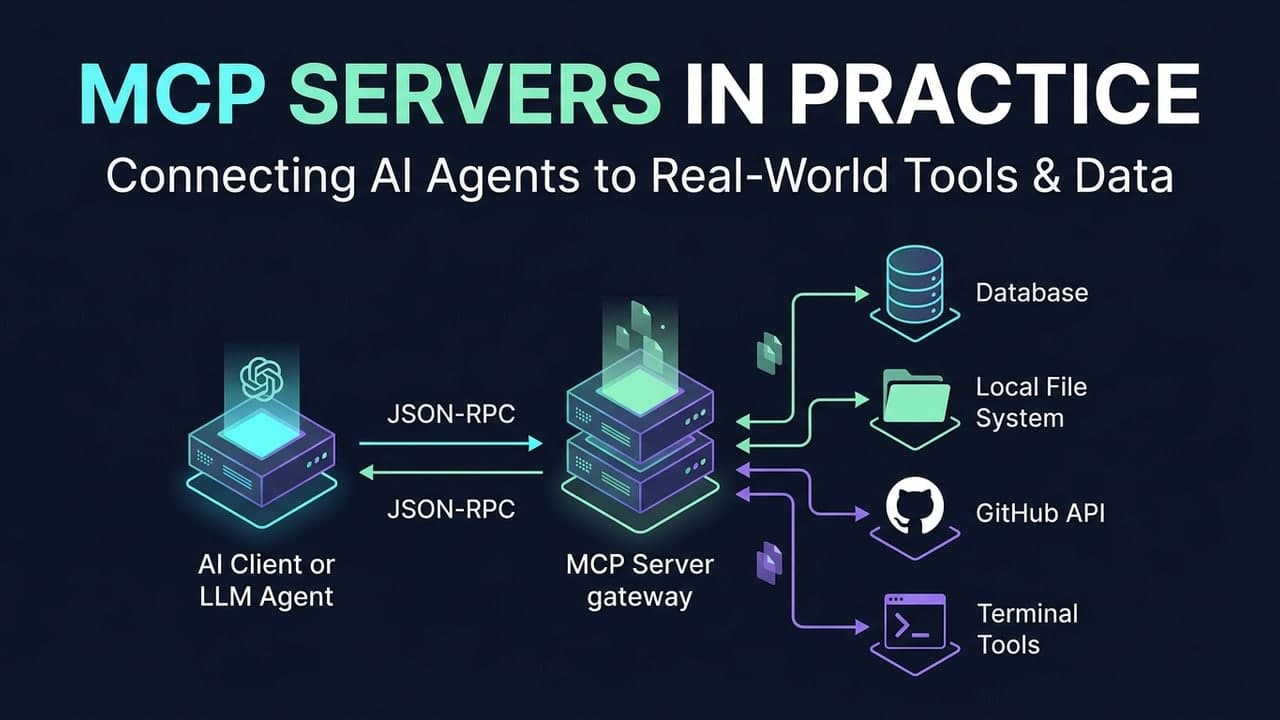
The Model Context Protocol (MCP), open-sourced by Anthropic, introduces a paradigm shift away from monolithic agentic silos and custom, provider-specific tool-calling integrations. Think of MCP as the USB-C port for artificial intelligence. Instead of forcing every developer to write bespoke glue code for every LLM provider—such as OpenAI Function Calling, Anthropic Tools, or Gemini Function Declarations—MCP establishes an open standard client-server architecture.
- The Host Application (such as Claude Desktop or an AI-enabled Integrated Development Environment) acts as the MCP Client.
- The Extension acts as the MCP Server, exposing local capabilities through a uniform interface.
This decouples the reasoning engine (the LLM) from the environment interface, allowing any MCP-compliant client to communicate seamlessly with any MCP server.
What We Are Building
Throughout this guide, we examine how an MCP server transforms static text generation into dynamic, tool-wielding capability. We will dissect the protocol anatomy, walk through concrete production implementations such as local workspace navigation, live database querying, and cloud container orchestration, compare MCP against traditional function calling and Retrieval-Augmented Generation (RAG), and evaluate future directions for secure, modular AI agents.
Core Concepts: Anatomy of the Protocol
The Client-Server Contract
MCP is built on top of JSON-RPC 2.0, a stateless, lightweight remote procedure call protocol encoded in JSON that defines a strict bidirectional message exchange between the MCP Client and the MCP Server.
- The Handshake: When the host application starts, it launches or connects to the MCP server and initializes a session via an
initializerequest, negotiating protocol versions and capabilities. - Lifecycle Management: The client and server exchange capability descriptions. Once initialized, the client can query resources, prompt templates, and tools exposed by the server. Notifications and requests flow asynchronously over the underlying transport.
Below is a conceptual example of a TypeScript-based MCP server initialization using the official @modelcontextprotocol/sdk:
import { Server } from "@modelcontextprotocol/sdk/server/index.js";
import { StdioServerTransport } from "@modelcontextprotocol/sdk/server/stdio.js";
import {
  CallToolRequestSchema,
  ListToolsRequestSchema,
} from "@modelcontextprotocol/sdk/types.js";

// Initialize the MCP server instance
const server = new Server(
  {
    name: "example-mcp-server",
    version: "1.0.0",
  },
  {
    capabilities: {
      tools: {},
    },
  }
);
The Triad of Capabilities
The core protocol specification divides server capabilities into three distinct primitives:
- Resources: Exposing readable data, files, logs, and application context to the model via uniform resource identifiers (
mcp://workspace/file.ts). Resources are client-driven or server-notified data feeds. - Prompts: Providing reusable, templated workflows and guided user interactions directly to the user interface of the host application, allowing users to invoke structured multi-step prompts effortlessly.
- Tools: Granting the model active agency to execute code, query databases, invoke shell commands, and mutate state. Tools are model-driven; the LLM decides when and how to call them based on user intent.
Transport Mechanisms
MCP abstracts underlying communication channels via two primary transport layers:
- Standard I/O (
stdio): Ideal for local isolation. The host application spawns the MCP server as a local subprocess, communicating via standard input and standard output streams. This ensures zero network exposure and seamless local environment execution. - Server-Sent Events (
SSE): Designed for remote architectures. The server streams events to the client over HTTP SSE, while client requests are sent via standard HTTP POST endpoints, enabling secure, remote cloud-hosted tool servers.
Real-World Implementations: MCP Servers in Action
Local Workspace Navigation
Granting an LLM safe read/write access to a local development repository allows it to refactor code, run tests, and inspect directory structures. Below is a complete implementation of an MCP server utilizing stdio transport that exposes a tool for reading local files securely within a designated workspace root.
import { Server } from "@modelcontextprotocol/sdk/server/index.js";
import { StdioServerTransport } from "@modelcontextprotocol/sdk/server/stdio.js";
import {
  CallToolRequestSchema,
  ListToolsRequestSchema,
  McpError,
  ErrorCode,
} from "@modelcontextprotocol/sdk/types.js";
import * as fs from "fs/promises";
import * as path from "path";

const WORKSPACE_ROOT = process.cwd();

const server = new Server(
  { name: "workspace-mcp", version: "1.0.0" },
  { capabilities: { tools: {} } }
);

server.setRequestHandler(ListToolsRequestSchema, async () => ({
  tools: [
    {
      name: "read_file",
      description: "Reads the contents of a file within the workspace.",
      inputSchema: {
        type: "object",
        properties: {
          filePath: { type: "string", description: "Relative path to the file" },
        },
        required: ["filePath"],
      },
    },
  ],
}));

server.setRequestHandler(CallToolRequestSchema, async (request) => {
  if (request.params.name !== "read_file") {
    throw new McpError(ErrorCode.MethodNotFound, `Unknown tool: ${request.params.name}`);
  }

  const filePath = String(request.params.arguments?.filePath);
  const absolutePath = path.resolve(WORKSPACE_ROOT, filePath);

  // Security boundary check: prevent path traversal attacks
  if (!absolutePath.startsWith(WORKSPACE_ROOT)) {
    throw new McpError(ErrorCode.InvalidParams, "Access denied: Path is outside the workspace root.");
  }

  try {
    const data = await fs.readFile(absolutePath, "utf-8");
    return {
      content: [{ type: "text", text: data }],
    };
  } catch (error: any) {
    return {
      content: [{ type: "text", text: `Error reading file: ${error.message}` }],
      isError: true,
    };
  }
});

async function run() {
  const transport = new StdioServerTransport();
  await server.connect(transport);
  console.error("Workspace MCP Server running on stdio");
}

run().catch((error) => {
  console.error("Server fatal error:", error);
  process.exit(1);
});
Database Query Engine
Connecting an LLM directly to a staging PostgreSQL database enables dynamic schema inspection and safe, read-only analytics. Below is a pattern utilizing the standard node-postgres pg library to dynamically expose schema metadata and execute queries safely.
import { Server } from "@modelcontextprotocol/sdk/server/index.js";
import { StdioServerTransport } from "@modelcontextprotocol/sdk/server/stdio.js";
import { CallToolRequestSchema, ListToolsRequestSchema } from "@modelcontextprotocol/sdk/types.js";
import pkg from 'pg';
const { Pool } = pkg;

const pool = new Pool({
  connectionString: process.env.DATABASE_URL || "postgres://user:pass@localhost:5432/staging_db",
});

const server = new Server(
  { name: "db-mcp", version: "1.0.0" },
  { capabilities: { tools: {} } }
);

server.setRequestHandler(ListToolsRequestSchema, async () => ({
  tools: [
    {
      name: "execute_readonly_query",
      description: "Executes a read-only SQL query against the staging database.",
      inputSchema: {
        type: "object",
        properties: {
          query: { type: "string", description: "SQL SELECT query to execute" },
        },
        required: ["query"],
      },
    },
  ],
}));

server.setRequestHandler(CallToolRequestSchema, async (request) => {
  if (request.params.name === "execute_readonly_query") {
    const query = String(request.params.arguments?.query);

    // Strict enforcement: ensure query starts with SELECT
    if (!query.trim().toUpperCase().startsWith("SELECT")) {
      return {
        content: [{ type: "text", text: "Error: Only read-only SELECT queries are permitted." }],
        isError: true,
      };
    }

    const client = await pool.connect();
    try {
      const result = await client.query(query);
      return {
        content: [{ type: "text", text: JSON.stringify(result.rows, null, 2) }],
      };
    } catch (err: any) {
      return {
        content: [{ type: "text", text: `Database error: ${err.message}` }],
        isError: true,
      };
    } finally {
      client.release();
    }
  }
  throw new Error("Tool not found");
});

const transport = new StdioServerTransport();
await server.connect(transport);
Cloud Infrastructure Orchestration
Interfacing with container engines like Docker through a remote SSE-based MCP server allows developers to monitor container health and retrieve logs on demand from anywhere in their infrastructure.
import { Server } from "@modelcontextprotocol/sdk/server/index.js";
import { SSEServerTransport } from "@modelcontextprotocol/sdk/server/sse.js";
import { CallToolRequestSchema } from "@modelcontextprotocol/sdk/types.js";
import express from "express";
import Docker from "dockerode";

const docker = new Docker({ socketPath: '/var/run/docker.sock' });
const app = express();

const server = new Server(
  { name: "docker-mcp", version: "1.0.0" },
  { capabilities: { tools: {} } }
);

server.setRequestHandler(CallToolRequestSchema, async (request) => {
  if (request.params.name === "list_containers") {
    const containers = await docker.listContainers({ all: true });
    const summary = containers.map(c => ({
      id: c.Id,
      name: c.Names[0],
      state: c.State,
      status: c.Status
    }));
    return { content: [{ type: "text", text: JSON.stringify(summary, null, 2) }] };
  }
});

let transport: SSEServerTransport;

app.get("/sse", async (req, res) => {
  transport = new SSEServerTransport("/messages", res);
  await server.connect(transport);
});

app.post("/messages", async (req, res) => {
  await transport.handlePostMessage(req, res);
});

app.listen(3001, () => {
  console.log("Docker MCP SSE Server running on port 3001");
});
Architectural Comparisons: MCP vs. Traditional Approaches
MCP vs. Custom Function Calling APIs
| Metric | Traditional Function Calling (OpenAI/Anthropic SDKs) | Model Context Protocol (MCP) |
|---|---|---|
| Integration Pattern | Bespoke code written per provider API schema. | Standardized JSON-RPC protocol implemented once. |
| Reusability | Locked into specific vendor payload structures. | Plug-and-play across any compliant client (Claude, IDEs, custom agents). |
| Lifecycle & State | Stateless function definitions passed per API turn. | Persistent client-server connection with dynamic capability discovery. |
MCP vs. Retrieval-Augmented Generation (RAG)
- Retrieval-Augmented Generation (RAG)—a technique that supplements model knowledge by fetching relevant snippets from an external database—excels at semantic search across massive static corpuses such as documentation wikis and legal archives by converting text chunks into vector embeddings. However, RAG is inherently static and read-only.
- MCP excels at active programmatic interaction, allowing models to execute code, call APIs, mutate database rows, and inspect live logs. When an AI needs to take action or read live state that cannot be pre-indexed into vectors, deploying dedicated MCP servers becomes mandatory.
Ecosystem Fragmentation and the N x M Problem
Historically, building $N$ AI client applications that needed to integrate with $M$ internal tools required $N \times M$ custom integration layers, creating a combinatorial maintenance nightmare for engineering teams.
[Custom Client 1] ---> [Bespoke Glue] ---> [Tool A]
[Custom Client 2] ---> [Bespoke Glue] ---> [Tool B]
(N x M Integration Complexity)
MCP solves this by establishing a universal adapter standard. Developers build an MCP server once, and any MCP-compatible AI client can immediately discover and interact with those tools without modifying the underlying implementation.
[Client A] \
            ---> [MCP Protocol Standard] ---> [MCP Server (Tools A, B, C)]
[Client B] /
(1 Standard Interface)
Conclusion: The Future of Modular AI Agents
The Road Ahead
As autonomous multi-agent systems evolve, the boundary between client applications and server-side environments will continue to blur. Emerging patterns involve decentralized MCP hosting, where microservices expose native MCP endpoints alongside standard REST and GraphQL APIs, allowing AI agents to navigate enterprise service meshes dynamically and efficiently.
Securing the Protocol
Because MCP servers grant models real-world execution privileges, robust security architecture is mandatory to prevent catastrophic failures:
- Authentication & Authorization: Remote SSE servers must enforce Transport Layer Security (TLS), OAuth2, or mutual TLS (mTLS) to cryptographically verify client identity.
- Input Sanitization & Sandboxing: Tool handlers must treat all arguments received from LLMs as untrusted input. Path traversal checks, parameterized SQL queries, and containerized sandboxes such as gVisor or Docker prevent prompt injection attacks from escaping into host systems.
- Human-in-the-Loop Confirmation: High-impact tool calls, including dropping database tables, deleting local files, or executing financial transactions, should require explicit user confirmation within the host client user interface before execution.
Final Takeaway
The Model Context Protocol transforms LLMs from isolated chat interfaces into active orchestrators of real-world software systems. By decoupling the reasoning engine from execution environments through a standardized protocol, developers can build robust, modular, and secure AI-native infrastructure for the era of executable context.