Note on Transparency: This article was generated with the assistance of Artificial Intelligence to provide a comprehensive and up-to-date overview of the discussed topic.
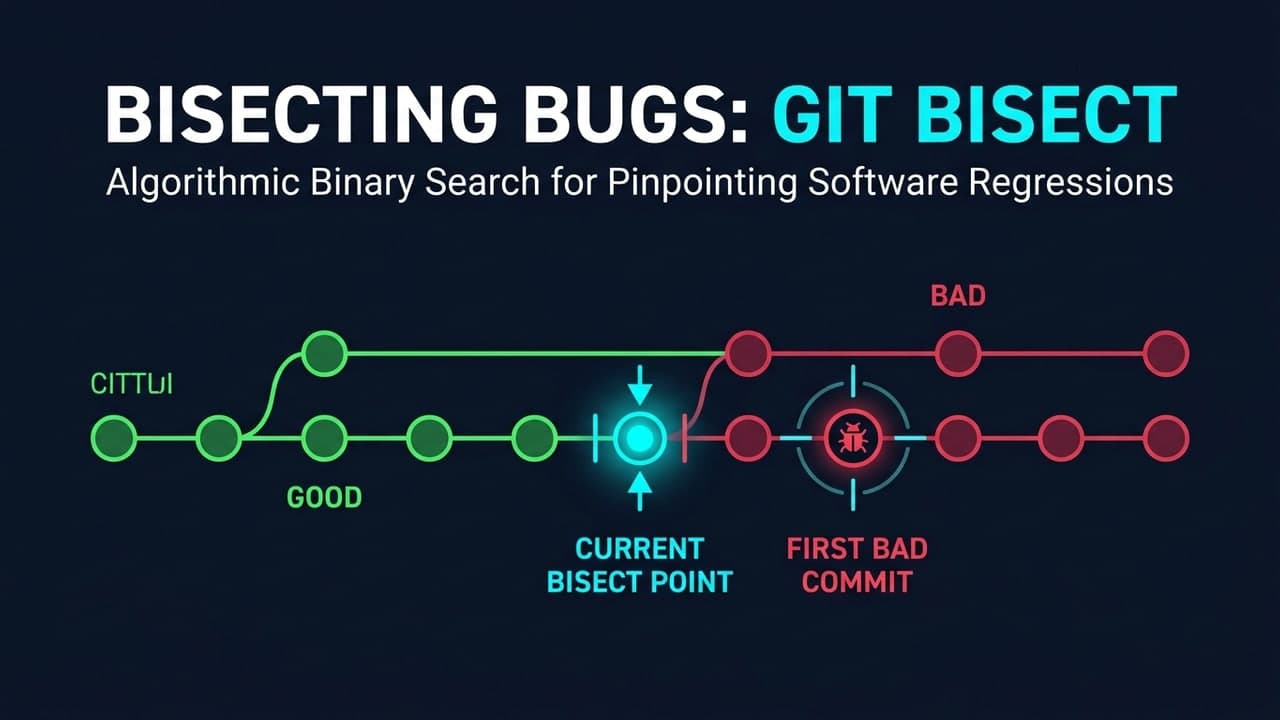
git bisect finds the exact commit that introduced a bug by binary-searching your commit history: you mark one commit "good" and one "bad," and it checks out the midpoint for you to test, narrowing the range by half on each pass. For a bug hidden somewhere across hundreds of commits, that turns an open-ended hunt into roughly log₂(n) test cycles.
Introduction: The Unbearable Weight of the Unseen Bug
Every developer knows the sinking feeling. You've just pulled the latest changes, everything should be fine, but suddenly, something's broken. A button doesn't click, a report is wrong, or the application mysteriously crashes. You stare at hundreds, maybe thousands, of lines of new code, and the bug feels like a needle in an impossibly large haystack. Debugging becomes a soul-crushing quest, a time sink that drains energy and momentum from your project.
But what if there was a way to turn this chaotic search into a systematic, almost meditative process? What if a single Git command could not only pinpoint the exact moment a bug was introduced but also fundamentally shift your approach to problem-solving? Enter git bisect. It’s not just another command-line utility; it’s a powerful methodology that instills core debugging principles, transforming you from a frustrated bug hunter into an efficient, surgical troubleshooter.
This post will peel back the layers of git bisect, revealing its elegant power and showing you how it fundamentally teaches you to debug with precision, clarity, and significantly less stress. We'll explore its mechanics, delve into the mindset it cultivates, and see it in action across real-world scenarios, ultimately elevating your entire debugging game.
I. The Binary Quest: Deconstructing git bisect's Power
At its heart, git bisect leverages one of computer science's most elegant solutions: the binary search algorithm. Imagine you have a sorted list of numbers and you need to find a specific one. Instead of checking each number one by one, you'd jump to the middle, decide if your target is in the first or second half, and repeat. Each step halves the search space. git bisect applies this same genius to your commit history, swiftly narrowing down the range of potential culprits.
The Core Algorithm: How Binary Search Pinpoints Problems
When you tell git bisect that a recent commit is "bad" (broken) and an older commit is "good" (working), it doesn't just guess. It intelligently checks out a commit roughly in the middle of that range. You then test that commit. If it works, you mark it "good"; if it fails, you mark it "bad." Git then discards half of the remaining commits from consideration. This process repeats, dividing the problem space by two with each step.
This logarithmic reduction is incredibly efficient. If you have 1,000 commits between your known good and bad states,
git bisectcan find the exact offending commit in a maximum oflog2(1000)steps, which is only about 10 steps! Compare that to manually checking commits, and the time savings are astronomical. It’s like finding a single faulty light bulb in a string of a thousand, not by checking each one, but by cutting the string in half repeatedly until you isolate the bad bulb.
Hands-On: Navigating Your First Bisect Session
Let's walk through a typical manual git bisect session. Suppose you know your main branch is broken now (HEAD), but it was working last week, say, at a commit identified by its hash abcde123.
First, you tell Git to start the bisect process:
git bisect startNext, you mark your current, broken state as "bad":
git bisect badThen, you point to a known working commit as "good":
git bisect good abcde123 # Replace with your actual good commit hash or a tag like 'v1.0'At this point, Git automatically checks out a commit roughly halfway between abcde123 and HEAD. Now, your job is simple: test the code at this new commit. Does the bug exist?
- If yes, the bug was introduced before or at this commit. You tell Git:
git bisect bad. - If no, the bug was introduced after this commit. You tell Git:
git bisect good.
You repeat this test-and-mark cycle. Git will keep checking out new midpoint commits until it narrows down the range to a single commit: the first "bad" commit. This is your culprit!
Once git bisect successfully identifies the problematic commit, it will display its hash and commit message. To return your repository to its original state (before the bisect session), you run:
git bisect resetThis command gracefully exits the bisect session and returns your HEAD to where it was when you started. It's clean, efficient, and ensures you don't leave your repository in an unusual state.
Automating the Hunt: git bisect run for the Rigorous
While manual testing works wonders for quick checks or complex, visual bugs, what if your bug can be detected by an automated test? Or a simple command? That's where git bisect run shines. You can provide a script or command, and Git will execute it for each intermediate commit. If the script exits with a non-zero status, Git marks the commit as "bad"; if it exits with zero, it's "good."
# Example: Using a test script 'verify_bug.sh'
# This script should return 0 if the code is good (bug NOT present)
# and a non-zero exit code if the code is bad (bug IS present).

git bisect start HEAD <known_good_commit_hash>
git bisect run ./verify_bug.sh
git bisect run turns a potentially tedious, repetitive task into an entirely hands-off operation, especially valuable for performance regressions or subtle functional bugs that can be programmatically verified. It's a testament to the power of combining a smart algorithm with automation.
Navigating Complexity: Branches, Merges, and Edge Cases
While the core git bisect workflow is straightforward, real-world repositories are messy. They have feature branches, hotfixes, and frequent merges. git bisect handles these gracefully, navigating the commit graph to find the linear path between your good and bad commits. In rare cases where your history is particularly tangled or you suspect multiple independent regressions, you might use advanced options like git bisect skip to jump over irrelevant or unbuildable commits, but for the vast majority of scenarios, the default behavior just works.
II. Debugging Through a New Lens: Lessons from the Bisecting Mindset
Beyond its utility as a command, git bisect fosters a powerful debugging mindset. It's like a seasoned mentor, silently guiding you towards better development practices and a more analytical approach to problems.
The Zen of Isolation: Finding the Smallest Reproducer
The very act of using git bisect forces you into a disciplined workflow. At each step, you must determine: "Does this specific commit exhibit the bug, or not?" This inherently pushes you to define the bug precisely and identify the smallest reproducer – the minimal set of steps or conditions required to make the bug appear. You can't waffle; you must isolate the problem. This discipline, cultivated repeatedly by git bisect, is invaluable in all forms of debugging. It moves you away from vague symptoms and towards concrete, testable conditions.
Committing to Clarity: The Debugging Advantage of Atomic Changes
git bisect thrives on clean, atomic commits — changes that address a single, well-defined purpose. Imagine trying to bisect a history where each commit is a sprawling mix of feature work, refactoring, and bug fixes. When git bisect points to such a commit, you're back to square one, sifting through a huge diff to find the specific problematic line.
This highlights a virtuous cycle: practicing
git bisectquickly teaches you the immense value of small, focused commits. Developers who regularly bisect their code naturally gravitate towards better commit hygiene, making future debugging exponentially easier for themselves and their teams. It's a powerful feedback loop that elevates the entire development process.
From Guesswork to Guarantees: Embracing Probabilistic Elimination
Traditional debugging often starts with guesswork: "Maybe it's in the authentication module? Or perhaps the database layer?" git bisect completely reframes this. Instead of speculating where the bug might be, it uses probabilistic elimination to tell you where it is not. Each git bisect good command provides a guarantee: the bug is not in this commit or any commit before it in the tested range. This systematic shrinking of the problem space replaces anxiety with certainty, transforming the debugging process from a shot in the dark to a guided missile launch.
The Psychological Edge: Reducing Cognitive Load and Frustration
Debugging can be incredibly frustrating, leading to burnout and decreased productivity. The unstructured nature of many debugging sessions contributes heavily to cognitive overload. git bisect offers a clear, structured path. It gives you a defined task at each step ("test this specific commit"), reducing the mental effort required to decide "what next?" This structured approach minimizes frustration, allowing you to focus your energy on the actual problem rather than the overwhelming scope of the search.
III. git bisect in Action: Real-World Triumphs and Strategic Choices
Let's look at how git bisect can be a hero in common development nightmares.
Case Study 1: Unmasking a Subtle Performance Regression
Imagine a web application that suddenly starts loading pages a few hundred milliseconds slower. It’s not a crash, but it's noticeable, impacting user experience. The team deployed multiple features in the last week, and no single commit immediately screams "performance killer."
This is a perfect scenario for git bisect. You mark the current, slow HEAD as "bad" and a known performant commit from last month as "good." Then, using git bisect run, you could automate a performance test (e.g., a script that hits a specific endpoint and measures response time, returning a non-zero exit code if the response time exceeds a threshold). git bisect would then methodically check out commits, run the test, and eventually, point to the single commit that introduced the performance dip. It might be an inefficient database query, an accidentally N+1 query, or a costly new dependency — pinpointing the commit is the first critical step to understanding and fixing it.
Case Study 2: Tracking Down a Persistent UI Glitch After a Major Refactor
A large-scale refactor has just been merged, touching dozens of files across multiple components. Now, a minor UI glitch appears — a button misaligns, or a modal doesn't close correctly. It's elusive because many interdependent changes occurred, making a manual search daunting.
Again, git bisect comes to the rescue. You identify the current broken state as "bad" and the pre-refactor commit as "good." Then, you manually bisect. At each midpoint commit, you compile the project, run the application, and visually inspect the UI element in question. Because git bisect systematically eliminates large chunks of code history, you quickly converge on the specific commit where the UI glitch first manifests, even within a massive refactor. This saves hours of comparing huge git diff outputs manually.
The Unsung Hero: When git bisect is Your Best Bet
git bisect excels in specific scenarios:
- Regressions: When something used to work but now doesn't.
- Performance Issues: Subtle slowdowns or memory leaks that manifest over time.
- Intermittent Bugs: Bugs that appear sporadically, making traditional debugging difficult, but can be triggered by a specific test.
- Subtle Interactions: Issues caused by changes in one module unexpectedly affecting another.
- Unknown Origins: When you have no idea which of many recent changes caused the problem.
Know Your Limits: When to Opt for Other Debugging Approaches
While powerful, git bisect isn't a silver bullet. It might be overkill or less effective when:
- The Bug is New & Localized: If you just wrote a small function and it's immediately broken, a traditional debugger or print statements are faster.
- No Known Good State: If the code was never working correctly,
git bisecthas no baseline. - Complex Dependencies/Builds: If compiling or running tests for intermediate commits is excessively slow or requires complex setup changes.
- Non-Code Issues: Bugs related to environment configuration, network issues, or third-party service outages.
IV. The Debugger's Arsenal: git bisect in Context
Debugging is rarely a one-tool job. git bisect is a vital piece of a larger arsenal, complementing other powerful techniques.
git bisect vs. Traditional Logging & Print Statements
Traditional Logging (console.log, print(), printf()): These are proactive, allowing you to trace variable states and execution paths as the program runs. They are excellent for understanding how a bug manifests within a specific piece of code.
git bisect: This is a retrospective analysis tool. Its purpose is not to show you how the bug occurs, but when and where (which commit) it was introduced. It's about finding the causal change, not the runtime symptom.
Use logging when you know roughly where the bug is but need to understand its dynamic behavior. Use
git bisectwhen you know a bug exists but have no clue which change introduced it.
git bisect vs. Interactive Debuggers (e.g., GDB, PDB, VS Code Debugger)
Interactive Debuggers: Tools like GDB (for C/C++), PDB (for Python), or built-in debuggers in IDEs like VS Code allow you to pause execution, step through code line-by-line, inspect variables, and change program state at runtime. They are unparalleled for understanding the precise logic of a bug once you've found the relevant code.
git bisect: It doesn't help you understand why a particular line of code is faulty. Instead, it helps you find which commit added that faulty line (or changed a working line to a faulty one).
These tools are highly complementary. First, use
git bisectto find the exact commit that introduced the bug. Then, use an interactive debugger on that specific commit to step through the new or changed code and understand the root cause of the problem.
git bisect vs. Manual Rollbacks & Cherry-picking
Manual Rollbacks/Cherry-picking: These are often used as corrective measures. If you know a specific commit is bad, you might git revert it or git cherry-pick working code from elsewhere. This is about fixing a known problem.
git bisect: This is an investigative tool. Its goal is to identify the unknown problematic commit. It's about discovery, not direct correction. While you might revert a commit found by git bisect, the command itself focuses purely on diagnosis.
Proactive Measures: How git bisect Complements Code Reviews & Automated Testing
Even the best code reviews and comprehensive automated tests can't catch everything. Regressions slip through. This is where git bisect acts as a crucial safety net. It’s your last line of defense against elusive bugs that bypass initial safeguards. Furthermore, by making it easy to find regressions, git bisect indirectly reinforces the value of robust test suites and clear commit messages, encouraging a culture of quality.
FAQ
What does git bisect actually do?
It performs a binary search over your commit history. You tell it one commit that's known good and one that's known bad, and it checks out the midpoint for you to test; based on whether the bug reproduces there, it narrows the search range by half each time until it lands on the exact commit that introduced the bug.
How many commits does git bisect need to check to find a bug?
Roughly log₂(n) test cycles for n commits between the known-good and known-bad points. That means even a bug hidden across 1,000 commits typically takes about 10 tests to isolate, instead of checking each commit one by one.
What is git bisect run used for?
git bisect run automates the whole process by running a script (like a test that exits non-zero on failure) at each checked-out commit instead of requiring you to manually test and mark good/bad every step. It's the practical choice when you have a reliable, scriptable way to reproduce the bug.
Do I need a unit test to use git bisect?
No — you can mark commits good or bad based on any reliable manual check (does the button work, does the report look right). A scriptable reproduction is only required if you want to use git bisect run to fully automate the search.
What are the limitations of git bisect?
It needs a clear, reproducible signal for "good" versus "bad" at any commit, which struggles with flaky or intermittent bugs. It also assumes a roughly linear history between the two points — heavily branched or merged history can complicate the search, and it can't help if the bug was present from the very first commit you have.
How is git bisect different from just reading commit diffs?
Reading diffs requires you to guess which change is suspicious and verify it manually, which doesn't scale past a handful of commits. git bisect replaces guessing with a systematic, guaranteed-to-converge search, regardless of how many commits are in the suspect range.
Conclusion: The Evolved Debugger
Debugging is an art, but like any art, it benefits immensely from systematic practice and powerful tools. git bisect isn't just a powerful Git command; it’s a masterclass in efficient problem-solving. It embodies the principles of isolation, clarity, and systematic elimination, transforming the often-frustrating hunt for bugs into a logical, almost enjoyable quest.
By integrating git bisect into your workflow, you don't just find bugs faster; you cultivate a more analytical mindset that spills over into all aspects of your development work. You'll write better commits, think more critically about changes, and approach complex problems with a calm, methodical assurance. So the next time an unseen bug casts its shadow over your project, remember git bisect. Embrace its binary wisdom, and evolve into a more confident, capable, and efficient debugger. Your future self (and your teammates) will thank you.
Reading Stack Traces Like a Detective
How I Traced a Revenue Drop to a Single Git Commit From 10 Months Ago