
This post will cover the details of creating insert scripts for SQL Server from the excel sheet without having to write the INSERT statements individually line by line. If your data started out as an API response rather than a spreadsheet, see How to import JSON data into Excel? for getting it into Excel first.
Step 1: Create the target table
We will first create a table named STUDENTS in SQL Server.
CREATE TABLE STUDENTS
(
ID INT                 NOT NULL,
NAME VARCHAR (20)      NOT NULL,
AGE INT                NOT NULL,
ADDRESS CHAR (25),
PRIMARY KEY (ID)
);
Step 2: Lay out the data in Excel
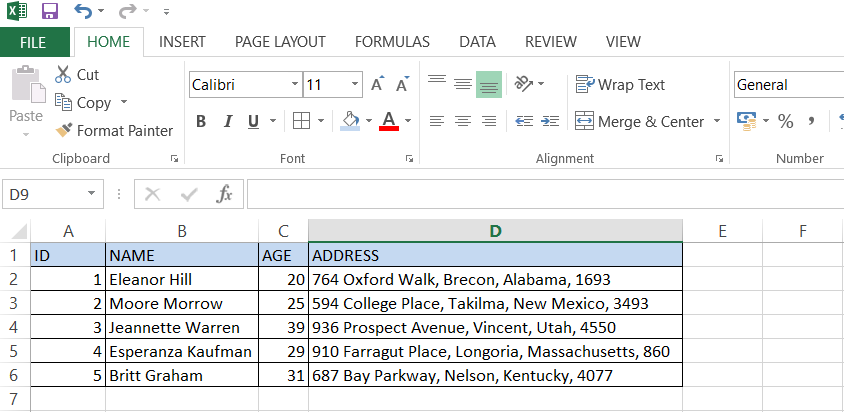
In the next steps we will open a new sheet in Excel and add the columns in the table along with few sample record.
Step 3: Build the INSERT formula
Now the next step is the most important one. We need to carefully add the text to generate the scripts from excel.
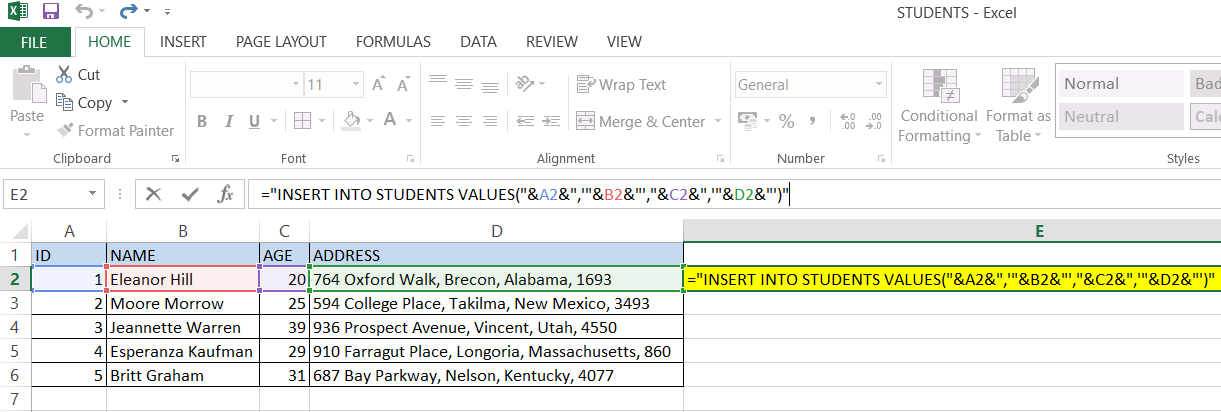
We need to click on the column E of the first data row and type the below mentioned text in the formula bar.
="INSERT INTO STUDENTS VALUES ("&A2&",'"&B2&"',"&C2&",'"&D2&"')"Here we have written a simple sql insert script but the only difference is that instead of having the actual values for the columns we have used the reference of the cells in excel.
Formula reference by data type
Mentioned below is the format in which we need to enter the text in the formula field based on the data type.
| Column | Data type | Formula text format | Notes |
|---|---|---|---|
| ID | INT | "&A2&" |
No single quotes needed. The same rule applies to the AGE field. |
| NAME | VARCHAR | '"&B2&"' |
Wrapped in single quotes since NAME is a varchar column. The same rule applies to the ADDRESS field. |
We can also use sql formulas like GETDATE() to include the CreatedDate or a hardcoded text like 'Script' for the CreatedUser in case we want to capture more details in the table.
Generating scripts for every row
To generate the insert script for all the rows we can drag the first row until the last row.
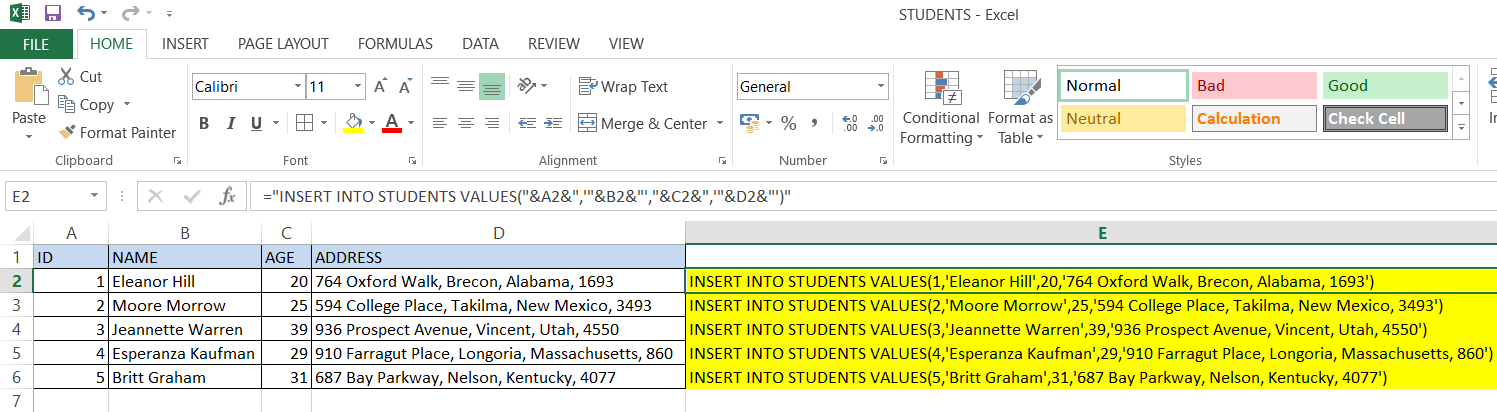
Once the script is generated we can copy it and run it in SQL Server to insert rows into the table. This example demonstrates the generation of Insert scripts but can generate any data specific script with the similar technique.
Hope this post is helpful in generating scripts from excel. These are some of the handy techniques that saves time and also inserts accurate data into the table.
Watch out for embedded single quotes
The formulas above assume text values never contain a single quote. If a NAME like O'Brien shows up, the generated script becomes:
INSERT INTO STUDENTS VALUES (3,'O'Brien',21,'...')which is broken SQL - the unescaped ' inside the name closes the string early, and the rest of the row is interpreted as invalid syntax. Wrap the text value in Excel's SUBSTITUTE function to double up any embedded quotes before they hit the formula, which is how SQL Server itself escapes a literal quote inside a string:
="INSERT INTO STUDENTS VALUES ("&A2&",'"&SUBSTITUTE(B2,"'","''")&"',"&C2&",'"&D2&"')"SUBSTITUTE(B2,"'","''") turns O'Brien into O''Brien, so the generated line becomes the valid 'O''Brien'. It's worth applying this to every text column, not just NAME, since you rarely know in advance which rows will contain an apostrophe.
Updates as on April 27, 2023
When you have a date or datetime value in the excel then you might notice the format of the generated
script through excel has the date format changed to number.
You can use the TEXT function in excel to resolve this issue.
The excel formula
="INSERT INTO EMPLOYEE VALUES('"&A1&"')"gives the result as
INSERT INTO EMPLOYEE VALUES('45043')when actually the cell A1 in excel contains 27-04-2023
You can resolve this by modifying the formula in excel as
="INSERT INTO EMPLOYEE VALUES('"&TEXT(A2,"yyyy/MM/dd")&"')"You can use any format of your choice to get the result. So basically what we have done is placed the excel TEXT(value,format_text) inside & in the existing formula.
Handling NULL values
When you want to enter NULL value while generating the script make sure that you do not put
NULL inside 'NULL'(Single Quotes) as this would generate the script with NULL string value and
not DB NULL value.
-- Incorrect syntax
="INSERT INTO EMPLOYEE VALUES('NULL')" --here you might actually put some column '&A1&' instead of 'NULL'
-- Correct syntax
="INSERT INTO EMPLOYEE VALUES(NULL)" --here you should put &A1& instead of NULL
A faster alternative for large sheets
Dragging a formula down thousands of rows works, but for one-off large exports it's worth knowing SQL Server Management Studio can do this natively without any Excel formulas at all: import the sheet into a staging table with the Import Flat File / Import Data wizard, then right-click the table → Generate Scripts → Data only to produce the INSERT statements for you, with correct quoting and NULL handling already handled. The Excel formula approach in this post is still the quicker option when you're hand-editing a small sheet or don't have direct SQL Server access to run a staging import.